A teleprompter that floats over every app.
Your script scrolls at the speed you set, full screen or in a small window on top of the camera, Instagram, TikTok or a video call. Cues show you how to say it, and a timer tells you when to wrap up.
- 3,600+ downloads
- — GitHub stars
- Free and MIT licensed
Hi, I'm Sam, and this is the one thing I wish I'd known sooner.
smile
You don't need to memorise a script to sound natural on camera.
slow down
Put it right under the lens and let it scroll at the pace you talk.
pause
Your eyes stay on the camera, and your words stay yours.
lean in
Try it on your next take.
The pink lines are cues, written for you to read and not to say, and the clock at the top is the timer counting how long you have been talking.
Hi, I'm Sam, and this is the one thing I wish I'd known sooner. smile
Swipe the card or tap Next. The pink words are cues, reminders you never say out loud, and the clock counts up from when you started.
Sits on top of:
What you get
Everything the teleprompter does
-
01
Scrolls at your pace
Set the speed once and the script moves on its own. Pause, or drag it back or ahead, whenever you need.
-
02
Floats over the app you film in
Your script stays on screen over the camera, Instagram, TikTok or a video call, and the camera never records it.
-
03
A window shaped to fit your shot
Rectangular or square, with its own text size, and it goes wherever you drag it.
-
04
A countdown and a timer that warns you
A few seconds to get ready before it moves, and a timer that changes color near the end and when you run over.
-
05
Hands-free play and pause
Start and stop the script from your Apple Watch or the Action Button.
-
06
Cues you read but never say
Reminders like [cue smile] show in color as they pass, telling you how to say the next line.
The app itself
What it looks like.
In a floating window over the home screen, and full screen with the timer running.
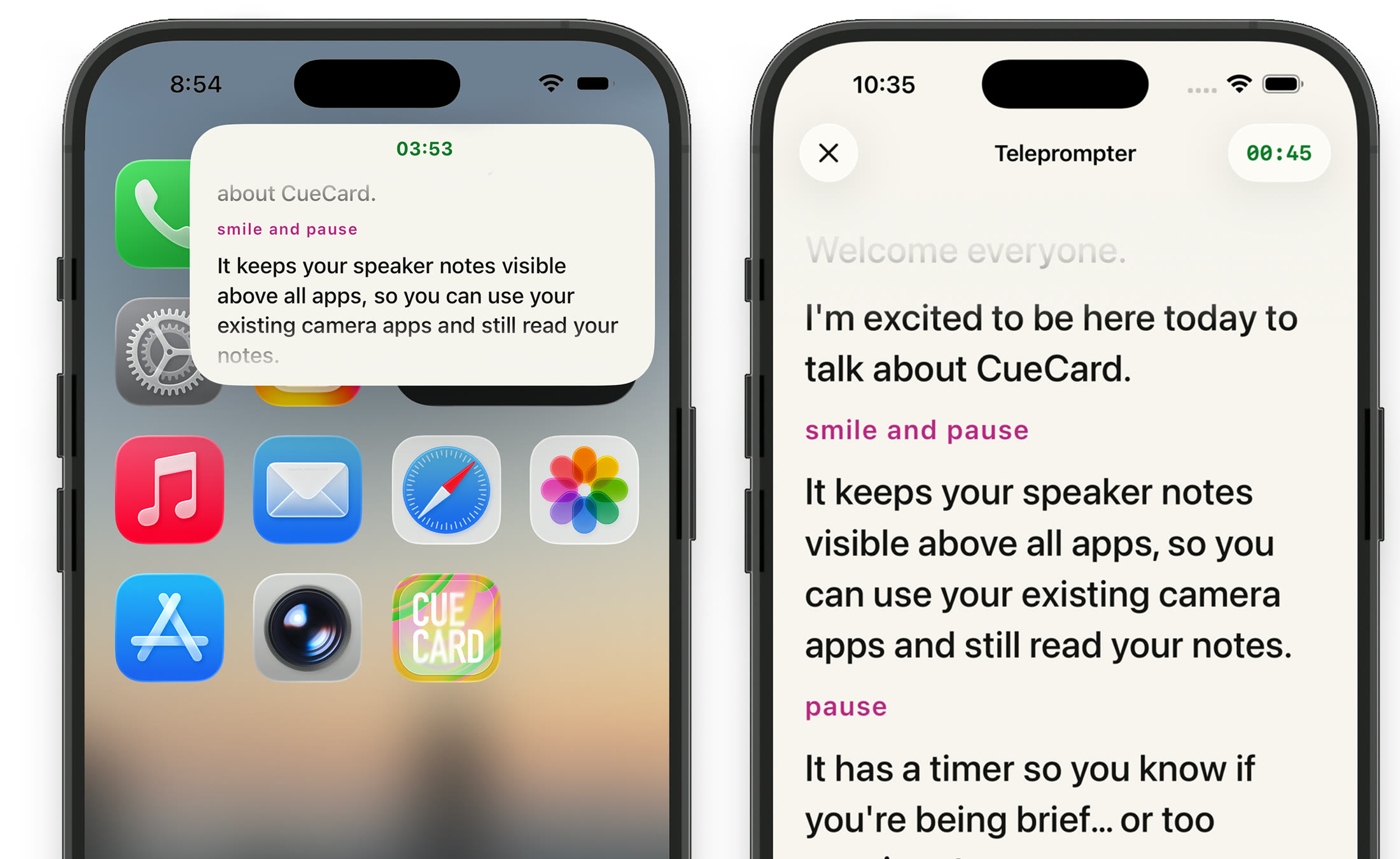
One app, three ways to use it
Read a script, speak from cards, or glance at your wrist.
-
Teleprompter Your whole script, scrolling at your pace, full screen or floating over the app you film in. You are here
- Cards One point at a time. Swipe through in the app, on the Lock Screen or on your watch. See how it works
- Apple Watch A remote for the teleprompter, and your cue cards on your wrist. See how it works
Get CueCard
On your phone in under a minute
Free, with no account required, no subscription and nothing to cancel.
On your phone, iPad and watch
A teleprompter that floats over the app you film in, and cue cards for when you speak.
Written setup guide
How to use the teleprompter on iPhone
Six steps from an empty page to your first take.
-
01
Choose Teleprompter
Tap the mode name at the top left of the editor and pick Teleprompter. Cards keeps its own script, so switching never mixes the two.
-
02
Write, paste or import the script
Type or paste into the editor, or use Import from File in the ••• menu. Type [ or tap Add Cue for a reminder, and choose Save as New to keep a named copy in Saved Content.
-
03
Set the speed and text size
Tap the gear for Teleprompter Settings. Set Scroll Speed and Text Size, and under Floating Window pick a Text Size and a Layout that leaves your camera controls clear.
-
04
Set the timer and countdown
Tap the timer beside the play button. Set a Duration, choose when to be warned with Warn in Last, and add a Countdown so you have time to get ready before the script moves.
-
05
Press play
Tap the green play button to open the teleprompter full screen. The buttons fade while it scrolls; tap the screen to bring them back.
-
06
Float it over your camera
Tap the picture-in-picture button, or simply leave CueCard, and the script keeps going in a floating window. Open your camera or recording app and drag the window up under the lens.
A short script to try
Select and copy this into CueCard. The [cue ...] tags are reminders to yourself; you leave the pause when you speak.
Hi, I'm Sam, and this is the one thing I wish I'd known sooner. [cue smile]
You don't need to memorise a script to sound natural on camera. [cue slow down]
Put it right under the lens and let it scroll at the pace you talk. [cue pause]
Your eyes stay on the camera, and your words stay yours.
Try it on your next take.
Related setup and delivery guides
Frequently asked
Questions about Teleprompter
What is a teleprompter app?
A teleprompter app shows your script on the screen and scrolls it while you speak, so you can read it without memorising it or looking down at paper. CueCard's teleprompter scrolls at the speed you set and can float over other apps, so you can read while you record in the app you already use.
Does the teleprompter follow my voice?
No. It scrolls at the speed you set in lines per minute and keeps that pace. If you need a moment, pause it, or drag the script back and it carries on from there.
Will the floating teleprompter show up in my video?
Not in a camera recording: the camera films you, not your screen. A screen recording or a screen broadcast captures the whole screen, so it would include the window.
Can I control the teleprompter without touching my phone?
Yes. The Apple Watch app plays, pauses and skips back ten seconds. On an iPhone with an Action Button and iOS 18, go to Settings › Action Button › Controls and choose Play or Pause under CueCard.
Is there a countdown before the script starts?
Yes. Tap the timer beside the play button and set a Countdown in seconds. The script waits that long before it starts to scroll.
Do I need an account to use CueCard?
No. There is nothing to sign up for on either app, and your scripts and settings live on your device. The one exception is Google Slides sync on the desktop app, which asks you to sign in with Google so it can read the notes out of your deck. See the privacy policy for the details.
Is CueCard free?
Yes. CueCard is completely free on mobile and on desktop, and open source under the MIT licence. Read the code on GitHub — and a star is always welcome.
Is CueCard open source?
Yes, MIT licensed, on GitHub. An app that can see your script is one worth being able to read the source of.
Where are my scripts stored?
On your device. Your notes are not uploaded to us. The privacy policy sets out exactly what is and is not kept.
How do I report a bug or ask for a feature?
Open an issue on GitHub, or email support@cuecard.dev. Both are read.