Cue cards that never fall out of order.
Write your talk as a deck of short cards and swipe through them one at a time, in the app, on your Lock Screen or on your Apple Watch. A timer keeps you on time, and cues remind you how to say each point.
- 3,600+ downloads
- — GitHub stars
- Free and MIT licensed
Good evening, everyone. Thank you for coming.
smile
Three years ago this was an idea on a napkin.
pause
Tonight it has 40 people and its first customers.
Thank you to the team, who made the napkin real.
look at them
Now, the part you came for: the food.
raise glass
The pink lines are cues, written for you to read and not to say, and the clock at the top is the timer counting how long you have been talking.
Good evening, everyone. Thank you for coming. smile
Swipe the card or tap Next. The pink words are cues, reminders you never say out loud, and the clock counts up from when you started.
What you get
Everything Cards does
-
01
One card, one thought
Short cards you take in at a glance, with a gentle nudge when one gets too long.
-
02
Swipe to turn
Swipe or tap to move through the deck, with dots showing where you are.
-
03
On your Lock Screen
Turn cards and watch the timer with your phone locked.
-
04
On your Apple Watch
Read your cards on your wrist, in step with your iPhone or without it.
-
05
A timer that warns you
It changes color near the end and when you run over, or simply counts up.
-
06
Cues on every card
Reminders like [cue pause] show in color wherever you read the card.
-
07
Saved decks, as plain text
Keep every deck, and import or export it as a text file.
The app itself
What it looks like.
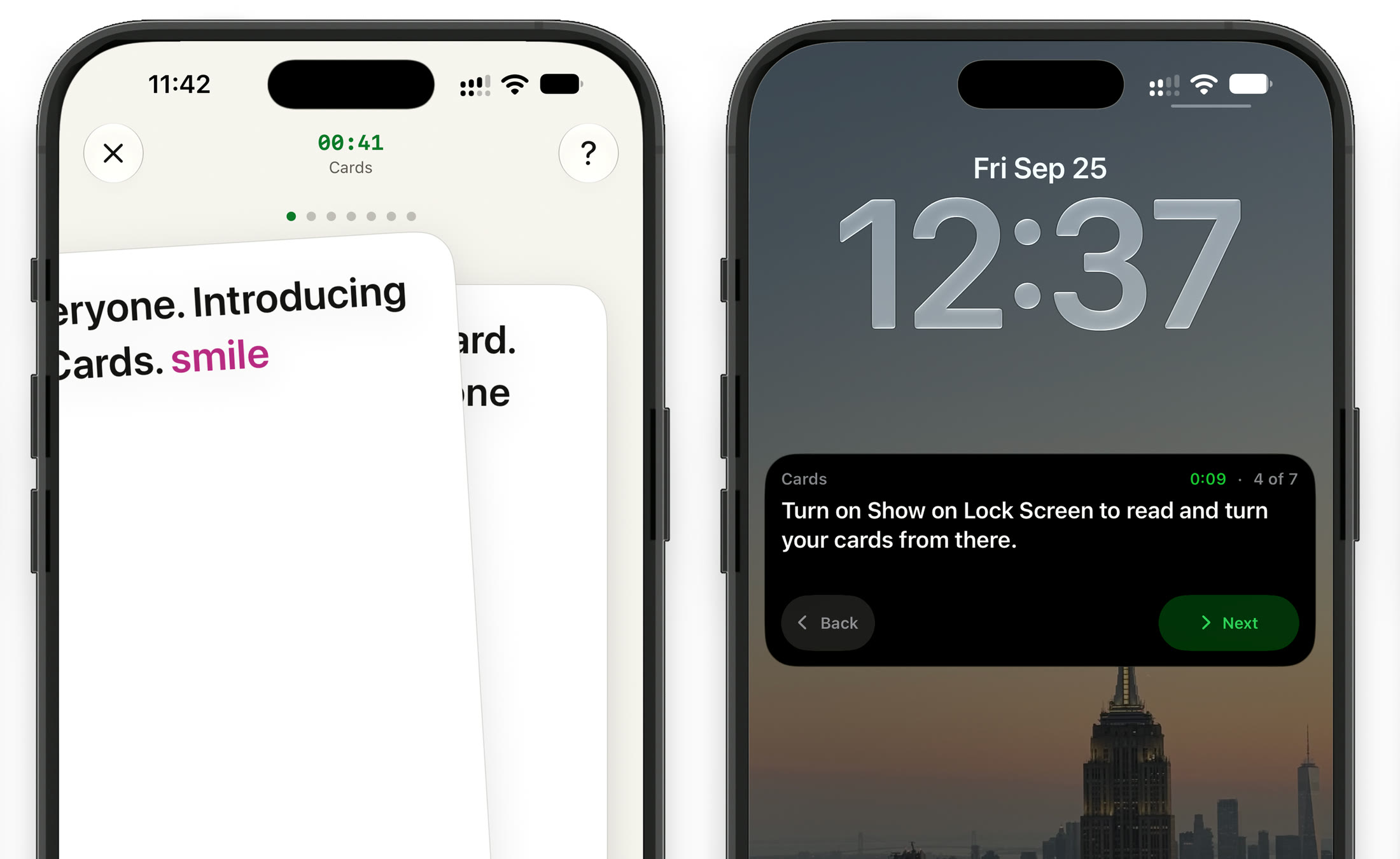
Swiping to the next card in the app, and the same deck on the Lock Screen with Back and Next.
One app, three ways to use it
Read a script, speak from cards, or glance at your wrist.
- Teleprompter Your whole script, scrolling at your pace, full screen or floating over the app you film in. See how it works
-
Cards One point at a time. Swipe through in the app, on the Lock Screen or on your watch. You are here
- Apple Watch A remote for the teleprompter, and your cue cards on your wrist. See how it works
Cue cards for
Whatever it is you have to stand up and say
Get CueCard
On your phone in under a minute
Free, with no account required, no subscription and nothing to cancel.
On your phone, iPad and watch
A teleprompter that floats over the app you film in, and cue cards for when you speak.
Written setup guide
How to make cue cards on iPhone
From an empty deck to speaking from your Lock Screen or watch, in six steps.
-
01
Switch to Cards
Tap the mode name at the top left of the editor and pick Cards. Cards has its own deck and settings, apart from the teleprompter's script.
-
02
Write one thought per card
Type the first card in the first box, then tap Create New Card for the next. Keep each under 280 characters, or 120 if you will read from the Lock Screen.
-
03
Add cues and save the deck
Type [ or tap Add Cue for reminders like [cue pause]. Choose Save as New in the ••• menu to keep the deck in Saved Content.
-
04
Set a timer
Tap the timer beside Read Cards, set the Duration and choose when to be warned with Warn in Last. Leave it at 0:00 and the timer counts up instead.
-
05
Tap Read Cards
The deck opens one card at a time. Swipe or tap Back and Next to move through it.
-
06
Read from the Lock Screen or your watch
Tap the gear for Cards Settings and turn on Show on Lock Screen, then lock your iPhone and turn cards from there. With the watch app installed, the deck is on your wrist as well.
A short deck to try
One card per paragraph: type each into its own box in CueCard. The [cue ...] tags are reminders to yourself, not words to say.
Good evening, everyone. Thank you for coming. [cue smile]

Three years ago this was an idea on a napkin. [cue pause]

Tonight it has 40 people and its first customers.

Thank you to the team, who made the napkin real. [cue look at them]

Now, the part you came for: the food. [cue raise glass]
Related setup and delivery guides
Frequently asked
Questions about Cards
What are digital cue cards?
Cue cards are short notes, one point per card, that you glance at while you speak instead of reading a full script. CueCard's Cards mode puts them on your iPhone, iPad or Apple Watch: one card on screen at a time, turned with a swipe, with a timer and colored cues.
How much should I write on each cue card?
One thought, in as few words as will remind you of it. CueCard allows 280 characters a card and marks anything over. If you read from the Lock Screen, keep it under 120, which is what the Lock Screen shows. More on writing cue cards.
Can I read my cue cards from the Lock Screen?
Yes. In Cards Settings, turn on Show on Lock Screen. When you open a deck, the card you are on, the timer and Back and Next buttons appear on the Lock Screen, so you can lock your iPhone and keep going.
Can I use cue cards on Apple Watch?
Yes. Open a deck on your iPhone and it shows on the watch too, and turning a card on either moves both. Choose Keep on Apple Watch from the ••• menu on a saved deck to read it on the watch without your iPhone. See CueCard on Apple Watch.
Should I use cue cards or a teleprompter?
Use the teleprompter when you need every word, like a video you film to camera. Use cards when you know what you want to say and only need the next point, like a speech, a toast or a class presentation. CueCard has both, and you switch between them from the mode name. Cue cards vs a teleprompter.
Can I import cue cards from a text file?
Yes. Use Import from File in the ••• menu. Put a [separator] line between cards and each part becomes its own card. Export to File writes a deck out the same way.
Do I need an account to use CueCard?
No. There is nothing to sign up for on either app, and your scripts and settings live on your device. The one exception is Google Slides sync on the desktop app, which asks you to sign in with Google so it can read the notes out of your deck. See the privacy policy for the details.
Is CueCard free?
Yes. CueCard is completely free on mobile and on desktop, and open source under the MIT licence. Read the code on GitHub — and a star is always welcome.
Is CueCard open source?
Yes, MIT licensed, on GitHub. An app that can see your script is one worth being able to read the source of.
Where are my scripts stored?
On your device. Your notes are not uploaded to us. The privacy policy sets out exactly what is and is not kept.
How do I report a bug or ask for a feature?
Open an issue on GitHub, or email support@cuecard.dev. Both are read.