Notes float over streaming apps.
Go live with talking points at your fingertips.
A floating teleprompter built for streamers. Your script sits on top of whatever app you are recording in and scrolls while you talk, so you can keep your eyes up and get the take in one go.
- 13K+ downloads
- Free and open source
No more forgetting your lines or switching apps mid-take.
Okay — recording. Mobile IRL streams, take one.
settle, then start
Everything I am saying is on a script floating above the camera app.
eyes up
It scrolls by itself, at the speed I talk, so I am not scrubbing back to find my place.
slow down here
The coloured lines are notes to me — where to pause, where to smile, what not to rush.
smile
They are for streamers who would rather sound like themselves than read off a card.
pause
One take. That is the point.
Adjust the speed to your pace. Pink lines are reminders, not words to read aloud.
Okay — recording. Mobile IRL streams, take one. settle, then start
Swipe or tap Next. Start the timer to practise your pace. Pink words are reminders, not part of your speech.
Sits on top of:
What you get
Everything you need to stay on script
-
01
A script that stays up while you film
Whatever streamers record in, CueCard floats above it.
-
02
Scrolls at your pace
Set the speed once, then pause or drag it whenever you need.
-
03
Cues for how to say it
Reminders like [cue slow down] show in color as they pass.
-
04
A countdown and a timer
A moment to settle before it moves, and a timer that keeps streamers to the length a take has to be.
-
05
Cue cards when you are speaking live
Short cards to swipe through, on your phone, Lock Screen or Apple Watch.
-
06
Scripts saved for next time
Find the scripts streamers reuse by title or text, and restore an earlier version when a rewrite needs undoing.
The app itself
What it looks like.
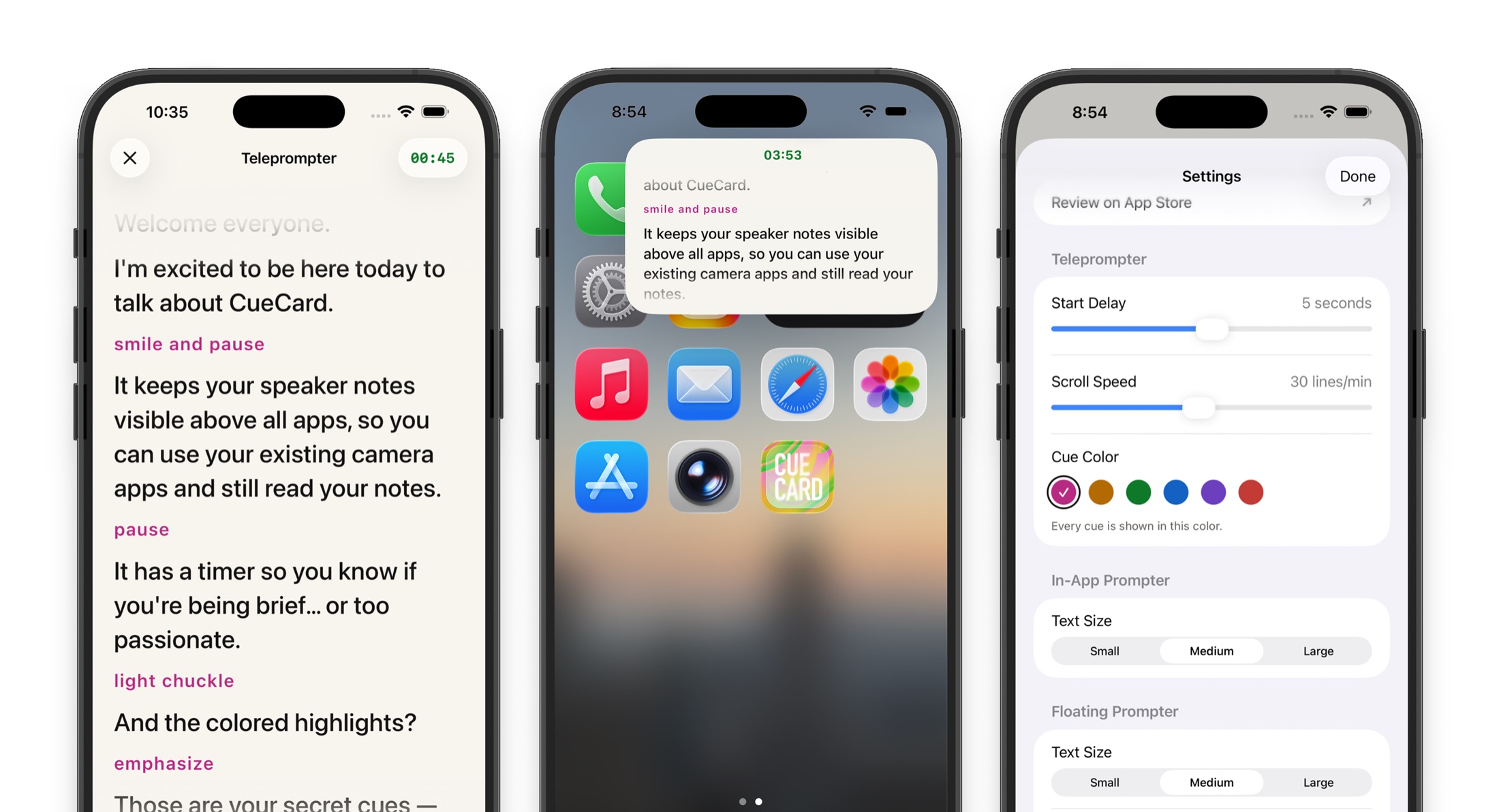
Read your script from the full screen, or shrink it into a small window that stays on top of whatever else you open.
Looking for the computer app instead? CueCard for Mac and Windows keeps your speaker notes on your screen and out of your screen share.
See it work
A minute of it, in use
Short films of the app doing the one thing it is for. Each opens on YouTube.
Where it earns its place
What streamers use it for
- Mobile IRL streams
- Just Chatting
- Live Q&A
- Event coverage
Also on big screens
The same teleprompter, on iPad.
CueCard Teleprompter for iPad
A screen big enough to read from a few feet away
An iPad is the screen a good many streamers end up propping under the lens. The script runs the full width of it, big enough to read from where you are standing with both hands free. Shrink it back into the floating window whenever you would rather film in an app. See CueCard Teleprompter on iPad.
Made for
Whoever else has to say it on camera
- Content Creatorsteleprompter app
- Coachesteleprompter app
- Course Creatorsteleprompter app
- Fitness Instructorsteleprompter app
- Podcastersteleprompter app
- Realtorsteleprompter app
- Salesteleprompter app
- Streamersteleprompter app
- Teachersteleprompter app
- TikTokersteleprompter app
- Vloggersteleprompter app
- YouTubersteleprompter app
Also on your computer
Presenting instead of filming? There is an app for that.
CueCard for Mac and Windows
Speaker notes your screen share cannot see
Most streamers present from a laptop as well as film on a phone. On a Mac or PC the CueCard window is left out of screen capture, so a call sees your deck and never your notes — same scripts, same cues, nothing on the shared screen.
Get CueCard
On your phone in under a minute
Free, with no account required, no subscription and nothing to cancel — and free on your computer too.
On your phone, iPad and watch
A teleprompter that floats over the app you film in, and cue cards for when you speak.
Written setup guide
A filming workflow for streamers
Prepare a run of show with a welcome, topic changes, and closing. Rehearse in the camera before going live, and pause the scroll during chat. Use a camera broadcast; screen broadcasts can show the notes.
-
01
Shape the script for Mobile IRL streams
Write the lines streamers need word-perfect, keep each one short, and save the script in CueCard.
-
02
Rehearse one short take
Float CueCard beside the lens, record the opening, then adjust the pace before filming the full version.
A short script to try
Select and copy this into CueCard. The [cue ...] tags are reminders to yourself; you leave the pause when you speak.
Welcome in, everyone.
[cue pause for chat]
Today I am working through the next part of this project.
I will stop between steps for questions.
[cue look up]
Let’s begin with what changed yesterday.
Related setup and delivery guides
Frequently asked
Questions from streamers
Does CueCard work with mobile streaming apps?
Yes. CueCard floats above any app including Twitch, YouTube Live, TikTok Live, and Instagram Live.
Can viewers see my notes during the stream?
No. CueCard sits on top of your camera app on screen, not in front of the lens, so the camera never records it. Your viewers see you and nothing else. The one exception is screen recording, which captures your whole screen — close the prompter first if that is how you are recording.
Is it useful for IRL streams?
Yes. Keep location info, talking points, or sponsor reminders visible while streaming on the go.
Can I use it for live Q&A sessions?
Yes. Keep prepared answers or topic notes visible so you can engage confidently with your chat.
Do I need an account to use CueCard?
No. There is nothing to sign up for on either app, and your scripts and settings live on your device. The one exception is Google Slides sync on the desktop app, which asks you to sign in with Google so it can read the notes out of your deck. See the privacy policy for the details.
Is CueCard free?
Yes. CueCard is completely free on mobile and on desktop, and open source. Read the code on GitHub — and a star is always welcome.