Free teleprompter & cue cards app
Read your script.
Speak naturally.
Float your script over the app you film in, or speak from cue cards at a glance. Free on iPhone, iPad and Apple Watch, with private speaker notes for Mac and Windows too.
- 5,000+ downloads
- Free and open source
Here is one small idea to try today.
look up and pause
Before your next recording or presentation, write down the one thing you want people to remember.
slow down
Give it a short example. Leave room for a breath.
smile
Then finish with a clear next step.
pause
A few useful words can be enough.
Adjust the speed to your pace. Pink lines are reminders, not words to read aloud.
Here is one small idea to try today. look up and pause
Swipe or tap Next. Start the timer to practise your pace. Pink words are reminders, not part of your speech.
One free app
Ready for your next video, speech or presentation.
Film with the teleprompter, give a talk from cards, and keep either one in reach on your Apple Watch.
- Teleprompter Your whole script, scrolling at your pace, full screen or floating over the app you film in. See how it works
- Cards One point at a time. Swipe through in the app, on the Lock Screen or on your watch. See how it works
- Apple Watch A remote for the teleprompter, and your cue cards on your wrist. See how it works
The app itself
What it looks like.
The script floating over another app, the teleprompter, a card being swiped, cards on the Lock Screen, and the settings.
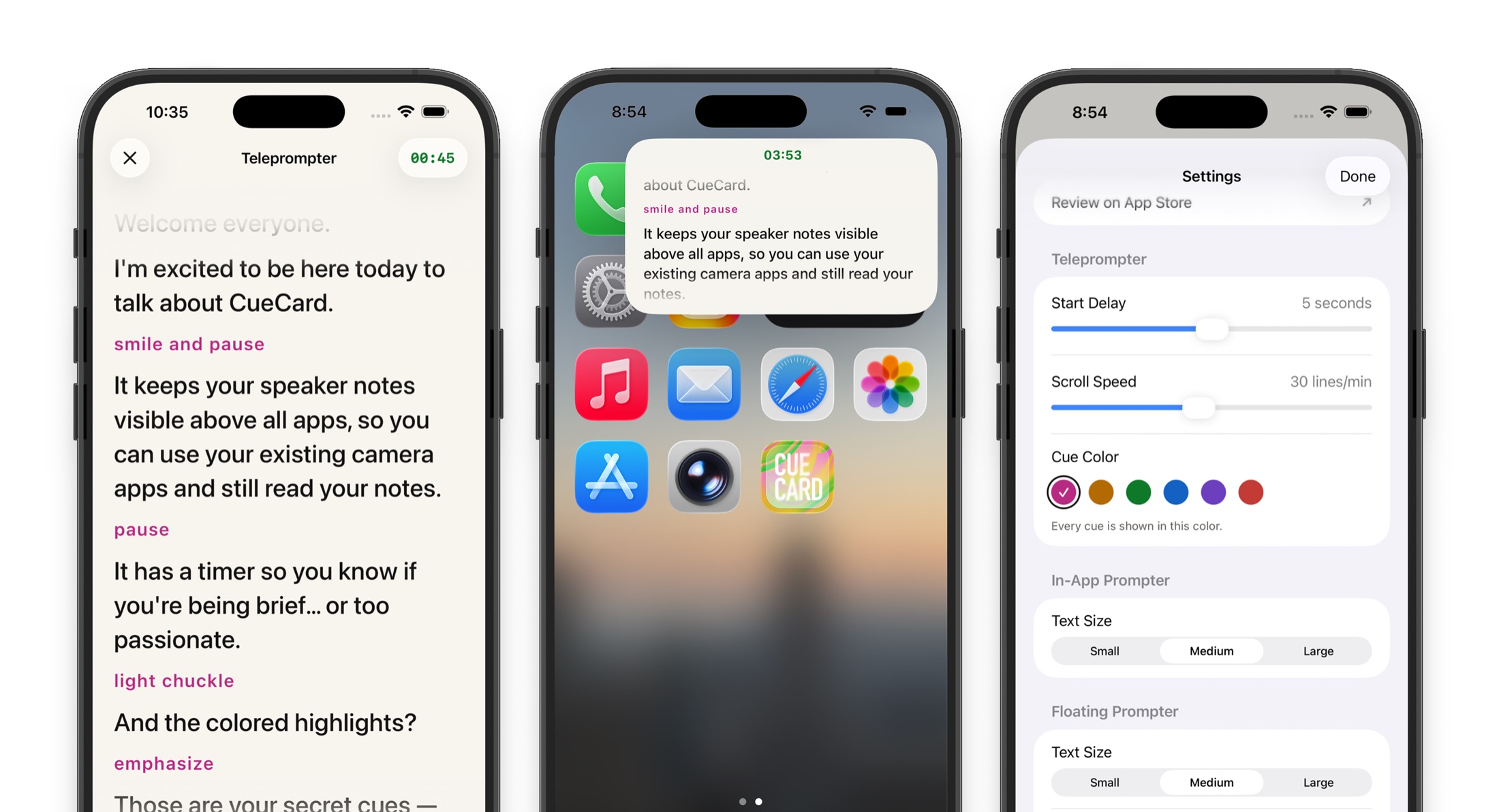
Looking for the computer app instead? CueCard for Mac and Windows keeps your speaker notes on your screen and out of your screen share.
Get CueCard
Your next take starts here.
Choose your device. Get the full app free, with no ads, subscription or required account.
On your phone, iPad and watch
A teleprompter that floats over the app you film in, and cue cards for when you speak.
What you get
Make the script fit you.
-
01
A teleprompter and cue cards in one app
Read a whole script as it scrolls, or speak from short cards one at a time.
-
02
Scrolls at your pace
Set the speed once and the script moves on its own. Pause or drag it whenever you need.
-
03
Floats over the app you film in
Your script stays on screen over the camera, Instagram, TikTok or a call, in a rectangular or square window.
-
04
Cards on your Lock Screen
Turn cards and watch the timer with your phone locked.
-
05
An Apple Watch app
Control the teleprompter from your wrist, and read your cards there, with or without your iPhone.
-
06
A timer that warns you
It changes color near the end and when you run over, in colors you can tell apart.
-
07
Cues you read but never say
Reminders like [cue smile] show in color, telling you how to say the next line.
-
08
Find a script or bring back an earlier draft
Search saved notes by title or text. Compare versions and restore an earlier save.
-
09
Keep notes as files
Choose a notes folder to keep the latest copy of every saved script and deck outside the app, even if you remove CueCard.
-
10
Free, private, no sign-up
No account, no ads and no subscription. Your scripts are not uploaded to CueCard.
See it work
A minute of it, on each screen
One short film for the iPhone app, one for the same app on iPad, and one for the Mac and Windows app. Each opens on YouTube.
For Mac & Windows
Private speaker notes for presentations and meetings.
CueCard for Mac and Windows
Speaker notes your screen share cannot see
The other half of CueCard runs on a Mac or PC, and it hides rather than floats: the window is left out of screen capture, so a call sees your deck and never your notes. Open it when you are presenting rather than filming. Any deck, or none at all — and Google Slides notes can follow your slides.
For iPhone, iPad & Apple Watch
Set up once. Stay natural on camera and on stage.
Start with what you are doing next, filming or giving a talk, then pick the guide that fits.
Quick setup
Speak from cue cards
Frequently asked
Asked before installing
What is CueCard Teleprompter?
CueCard Teleprompter is a free teleprompter and cue cards app for iPhone, iPad and Apple Watch. The teleprompter scrolls your script while you speak, full screen or in a small window above the camera, Instagram, TikTok or a video call. Cards shows a talk one card at a time, in the app, on the Lock Screen or on your Apple Watch. It is on the App Store today, and the Android app is still being built.
What is Cards mode?
Cue cards on your phone. Tap the mode name at the top left of the editor and choose Cards, write one short point per card, and tap Read Cards to swipe through them one at a time. It suits a speech, a toast or a class presentation, where you want reminders rather than a script. See Cards.
Is there an Apple Watch app?
Yes, and it comes with the iPhone app. It plays, pauses and skips back ten seconds in the teleprompter, and shows your cards on your wrist in step with the iPhone. Keep a deck on the watch to read it without your iPhone. See CueCard on Apple Watch.
Does the teleprompter show up in my recorded video?
Not when you are filming with the camera. The prompter is a window on your screen rather than something in front of the lens, so the camera records you and your background and nothing else. Screen recording is the one exception: a screen recording captures your whole screen, prompter included, so close the prompter first if that is how you are recording. On a Mac or PC it works differently — the desktop app really is left out of screen capture.
Is CueCard a free teleprompter app?
Yes. CueCard is free on iPhone and iPad, with no subscription, no trial and no paid tier, and the project is open source on GitHub.
Do I need an account to use CueCard?
No. There is nothing to sign up for on either app, and your scripts and settings live on your device. The one exception is Google Slides sync on the desktop app, which asks you to sign in with Google so it can read the notes out of your deck. See the privacy policy for the details.
Is there a teleprompter for iPad?
Yes, and the iPad is the best screen CueCard runs on. Read the script full width at arm's length like a studio prompter, or shrink it into a floating window over the app you are filming in. See CueCard Teleprompter on iPad.
Is CueCard available on Android?
Not yet. The Android app is still being built. The iPhone and iPad app is free and out now, and so is the app for Mac and Windows.
Is CueCard invisible on Zoom, Google Meet and Microsoft Teams?
Yes. CueCard is designed to be undetectable on Zoom, Microsoft Teams, Google Meet and similar apps: it is excluded from screen capture, so your speaker notes stay off the shared screen while your deck goes out normally. Run one practice call to confirm it behaves as you expect with your setup.